
Protecting your business from theft and unauthorized entry is a priority for any company, especially in a workplace where people, assets, and information are constantly on the move. Relying on traditional locks and keys is no longer enough for strong physical security, which is why a modern access control system has become essential. More than simply securing doors, these systems give you the ability to control, monitor, and document who enters and exits your buildings, so security stays consistent without slowing daily operations.
Choosing the right access control system makes a real difference, not only because it strengthens protection but also because it supports a smoother, more organized workplace through consistent access control system management. Once you understand what access control systems are, how an access control system functions in daily use, and which factors matter most, you can select a solution that fits your environment with confidence. That way, you safeguard your property and your people over the long term, even as your workplace changes.
Understanding Access Control Solutions and the Access Control System in the Workplace
Access control solutions are designed to ensure that only approved individuals can enter a building or specific areas within it, which matters more today than ever. Instead of relying on a single physical key, a modern access control system verifies your identity using credentials such as a keycard, mobile device, or biometric scan, then grants entry only if your permission matches the location and time. Each attempt to enter triggers a quick check in the background, so access feels seamless for authorized users while staying restricted for everyone else.
What makes this process work is the way access management is organized behind the scenes. Every user and their permissions are stored in a central database within the control panel, while readers installed at entry points communicate directly with that panel. When a credential is presented, the reader sends the data to the control panel, which decides whether to unlock the door based on the stored rules. Because the system handles verification and approval automatically, workplace movement stays efficient without sacrificing security or requiring someone to manually control entry.
For a deeper look at how this works and why it matters, read our blog “What Is an Access Control System and Why Is It Important for Businesses?”
Why an Access Control System Matters for Workplace Security
A well-implemented access control system strengthens physical security by preventing unauthorized entry into your workplace or restricted spaces within it. When access is limited to the right people, the risk of theft, damage, or other harmful activity drops significantly, since opportunities for unwanted entry are reduced before problems even begin. This creates a safer environment for employees and protects the assets that keep the business running.
Beyond securing doors, access control also plays a critical role in protecting sensitive information and high-value areas. Many workplaces store private records, proprietary data, or operational resources that should not be available to everyone, which is why access rules are often applied to spaces such as server rooms, document storage areas, and executive offices. By controlling who can enter these locations and when, access control supports security management while reducing internal and external risks at the same time.
Another key advantage is accountability, since every access attempt is recorded automatically. The system logs who entered, where they went, and when the entry occurred, creating a reliable timeline that supports investigations, audits, and daily oversight. Because people know their access activity is tracked, workplace behavior tends to stay more responsible, which reinforces a culture of security without needing constant supervision.
How Access Control Solutions Work in Daily Office Use
In a typical office setting, access control works in the background so smoothly that most employees barely notice it. Entry usually requires a simple tap or scan using access control credentials such as a card, phone, or fob, after which the system verifies permissions almost instantly and unlocks the door when access is approved. This keeps movement efficient during busy hours while maintaining consistent security throughout the day.
Access decisions are based on access privileges assigned to each user, which can vary depending on role, department, or schedule. An employee might be cleared to enter the main building at any time but allowed into specific rooms only during working hours, depending on how permissions are defined. Administrators manage these permissions through door access control software using the control panel, adjusting access as responsibilities shift, so the system stays aligned with workplace needs over time.
A standard access event typically follows this flow, even if it happens in a split second:
- Presentation: A user holds their access control credential near the reader at the door.
- Verification: The reader captures the credential data and sends it to the control panel.
- Authorization: The control panel checks the user’s permissions against the rules for that entry point and the current time.
- Action: If the request matches approved access, the panel triggers the door to unlock.
- Logging: The system records the event with the user’s identity, location, and timestamp for future reference.
Through this sequence, access control solutions maintain order at entry points, including areas supported by automatic door systems, while keeping a clear record of workplace movement, which matters most when security and accountability are required simultaneously.
Commercial Access Control Systems and Their Main Types
Commercial access control systems are built to protect business environments of all sizes, whether that means a small office suite or a multi-building corporate campus. Compared with residential setups, these systems are typically designed for heavier use and broader oversight, since they support larger user groups, flexible permission structures, and smoother coordination with other security layers. Because commercial access control systems rely on different credentials and operating models, organizations can align what they choose with the level of control their workplace requires.
Understanding the main types of access control makes the selection process clearer, especially when workplaces vary widely in layout and risk profile. Whether access needs to be managed for a single entrance or for many doors across multiple sites, there are access control solutions structured for that scale and complexity. The sections that follow outline the most common credential categories and explain how they fit into broader workplace requirements.
Want a fuller breakdown? Check out “Access Control System Types Explained: From Keycards to Mobile and Biometric Entry.”
Keycard, Mobile, and Biometric Access Control Solutions
Modern commercial access control systems support several authentication methods, each offering its own balance of security, convenience, and administrative control. The credential format you use shapes the daily experience of employees and visitors, while also influencing how strong your access policy can be. Many workplaces adopt one primary credential type, while others combine methods to reflect different risk levels across zones.
Most organizations still rely on familiar options like keycards and fobs, since they provide consistent performance and are easy to manage at scale. At the same time, mobile access control has become more common, allowing workers to use smartphones as credentials through secure digital verification. For areas where higher assurance is needed, biometric access control adds another layer by verifying unique physical traits, which makes unauthorized use far more difficult. Alongside these approaches, keypad entry remains widely used in environments that require code-based or layered authentication.
Here are the main credential types typically used in access control systems:
- Key Card and Fob Systems: Entry is granted through proximity cards or fobs presented to a reader.
- Mobile Access Control: Smartphones act as digital credentials that authenticate through approved access control solutions.
- Biometric Access Control: Fingerprints, facial patterns, or other physical identifiers confirm identity before access is approved.
- Keypad Systems: Users enter a PIN to request entry, either as a standalone method or alongside another credential.
Matching Commercial Access Control Systems to Workplace Needs
Choosing the right commercial access control system works best when it starts with a clear picture of how your organization operates and what it needs to protect. A system that fits a small professional office will differ from one used in a busy retail space or a multi-tenant building, because each environment faces different patterns of traffic, risk levels, and access expectations. When you look at the number of users, the sensitivity of your assets, and the way people move through entry points during a normal day, the most suitable access control model becomes much easier to see.
Different workplace types usually emphasize different priorities, so access control solutions tend to look different from one setting to another. A small office may focus on securing a main entrance and a few private rooms, while a retail store may care more about protecting stock areas behind the scenes. A multi-tenant building often needs flexible tools to manage separate organizations with distinct permissions, and a high-security facility may require strict identity verification at every step.
The table below summarizes how common workplace types often align with key access control features:
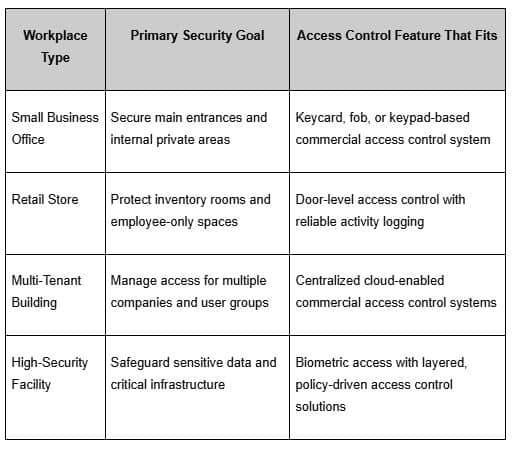
When the capabilities of a commercial access control system are aligned with real workplace needs, including entry points like swing doors, security becomes part of the natural flow of the business rather than an obstacle to everyday work.
Choosing the Best Access Control System for Long-Term Use
Selecting the best access control system for your business is a meaningful decision because it shapes both workplace safety and everyday operations as your organization evolves. What you need is a system that supports current requirements without locking you into a rigid setup, so security can keep pace as teams expand, spaces change, and new entry points come online. Scalability matters here because a well-designed access control system allows you to add users, doors, and locations smoothly, rather than requiring a full replacement each time your footprint expands.
Access control software sits at the center of that flexibility, since it keeps permissions consistent across sites while letting you manage access from a single structured environment. If your workplace extends into additional floors or new facilities, the right platform maintains the same standards of secure access control everywhere, even as complexity increases. Some environments require mandatory access control where rules are tightly governed from a single authority, but most workplaces benefit from access control solutions that remain structured yet adaptable, because they support long-term stability while still allowing change.
For a closer look at the mechanics behind this, read “How an Access Control System Works in Modern Businesses: Core Components and Flow.”
Features That Define the Best Access Control System
When comparing options, the best access control system is usually defined by a set of capabilities that keep security strong without making administration harder than it needs to be. Ease of use is one of those essentials because a clear interface helps administrators assign access correctly and helps users move through entry points without confusion. When a platform feels complicated or inconsistent, frustration rises, and errors become more likely, which is why a straightforward management experience directly supports better security outcomes.
A strong access control system also supports multiple credential types, allowing different areas to use different levels of verification without forcing a single method across the whole workplace. Keycards, PINs, mobile credentials, and biometric verification can operate within the same system, so access requirements can match the sensitivity of each space. Beyond credentials, reliability and system coordination matter just as much, because access control solutions should function consistently while working in step with other workplace security layers.
Key capabilities that typically distinguish the best access control system include:
- Support for multiple authentication methods within one access control system.
- A management dashboard that stays clear and intuitive for daily access management.
- Compatibility with other workplace security tools, so systems operate as a unified whole.
- Centralized control across locations through access control software.
- Consistent performance that protects entry points without disrupting normal movement.
With these features in place, commercial access control systems can protect every part of the workplace, including areas secured by sliding doors, while remaining dependable as needs change over time.
How a Modern Access Control System Supports Growth and Oversight
A modern access control system scales with your business, staying flexible as you add employees, spaces, or locations, while keeping security consistent. From one central dashboard, administrators can manage users, credentials, and permissions across every site without separate systems. Because cloud- and IP-based setups expand by adding doors and readers to the network, the system grows without constant hardware limits, giving your workplace long-term security that supports change rather than slowing it.
Choosing the right access control system keeps your workplace secure and your operations smooth, especially when options like keycards or biometric access offer different levels of control. By understanding these access control solutions, you can select a system that fits your environment today and supports growth tomorrow, as long as it works with your current setup and can expand when needed. If you’d like help deciding, our team can guide you through the options.
For businesses looking to strengthen entry security with a reliable, workplace-focused approach, R&S Overhead Doors of NorCal provides access control support that aligns with real operational needs. Our team understands how secure access connects to the flow of a building, helping you choose a system that protects people, property, and daily movement without adding friction. Contact us today or give us a call to discuss the right access control setup for your workplace.
Frequently Asked Questions
How does an access control system manage visitor entry in commercial workplaces?
An access control system streamlines visitor entry by issuing temporary credentials such as mobile passes, PINs, or access cards, then assigning clear limits on where and when those credentials work. Because permissions are time-bound and expire automatically, visitors only access approved areas during approved windows, while every entry is recorded at each access point. This enhances security without requiring staff to constantly escort or monitor visitors, since movement is controlled and logged by the system.
How do commercial access control systems remain effective as workplaces expand or change?
Commercial access control systems stay effective through scalability, since administrators can add users, doors, and locations without rebuilding the entire setup. With centralized access control software, permissions and credentials can be updated across sites from one place, even as layouts shift or headcount grows. This keeps access management consistent and secure at every location, because the system adapts as the workplace changes.
What’s the difference between physical access control and logical access control within an access control system?
Physical access control governs entry to real-world spaces such as buildings, rooms, and restricted areas, using credentials like cards or biometrics at doors and entry points. Logical access control governs entry to digital resources such as networks, files, and applications, using credentials like passwords or codes to enforce data security policies. Both protect access rights, but one secures physical spaces while the other secures digital environments.
What is an access control system, and how does it work in a workplace setting?
An access control system regulates who can enter specific workplace areas by verifying identity and matching it to predefined access rules, as outlined by Wikipedia. When an employee presents a credential at a reader, the information is sent to the control panel, which evaluates permissions for that door at that time and unlocks entry only if the request aligns with the policy, while logging the event to maintain a clear, traceable record of workplace access activity.
What are the main access control solutions used by businesses today?
Businesses commonly use access control solutions that rely on keycards or fobs, mobile credentials on smartphones, biometric verification, or keypad PINs, often combining methods in one system. Each solution supports different workplace needs, because some environments prioritize speed and convenience while others require stronger identity assurance. This variety allows commercial access control systems to fit both everyday access and higher-security areas.
What security advantages does an access control system provide for workplaces?
An access control system strengthens workplace security by preventing unauthorized entry, limiting access to sensitive areas, and reducing the risk of theft or data exposure. Every access attempt is logged with time and identity, which supports investigations and accountability when issues arise. Security management improves because the system enforces consistent rules across entry points, protecting both people and assets.
How do cloud-based access control solutions compare with traditional workplace systems?
Cloud-based access control solutions allow centralized management from any approved device, making it easier to update users and permissions across locations. Traditional systems require changes to be made on-site through local servers or panels, which can slow administration. Cloud management keeps oversight more flexible and consistent because access control software operates through a shared platform.
What features define the best access control system for workplace use?
The best access control system combines reliable performance with simple software management, while supporting multiple credential types such as cards, mobile access, PINs, and biometrics. It also scales across doors and locations and integrates smoothly with other security tools, so access policies stay unified. A system with these capabilities remains secure and easy to manage, even as workplace demands evolve.
How does an access control system integrate with other workplace security solutions?
An access control system integrates with other workplace security solutions by linking entry events to surveillance platforms and alarm monitoring, which makes it possible to verify activity and review it in context, as outlined by the U.S. Department of Commerce. When these systems share data, access logs can align with video footage or alarm triggers to strengthen oversight and speed up response, while security remains more coordinated across the site because access control acts as the central layer that ties the broader workplace security setup together.
What types of credentials do commercial access control systems support for workplace access?
Commercial access control systems support credentials such as keycards, fobs, mobile passes, PIN codes, and biometric identifiers, letting workplaces choose the level of verification each area requires. Credentials can be used alone or in combination when tighter control is needed. This flexibility helps organizations enforce access rules accurately across different entry points.